Posts

Showing posts with the label to-do list

A Peek Inside My Teaching Team's Task Tracker

Image
TLDR: This post is a behind-the-scenes look at a task tracker I’ve developed over years of managing teaching teams (from 3 to 36 teaching assistants). I share examples of the task lists we use each semester, plus templates for modules, exams, and weekly tasks. You’ll also get insight into how I design the tracker to streamline work and support my team. [ Also posted on Medium. ] I’ve written two blog posts about how I track tasks: my to-do lists and my teaching team’s to-do lists . But both are kind of abstract. I write about the things that go into them, but no concrete details. And I did this because I didn’t want to presume others’ contexts. However, that abstractness never fully sat well with me because, when it comes to learning, sometimes concrete examples or case studies are essential. So, this blog post introduces an example course teaching staff task tracker in a Trello board . Screenshot of some of the lists in the Trello board. This post is an experiment to see if peopl...
Revisit: How I organize the teaching staff of my 200+ student class

 When it comes to anyone’s advice on how to run your own course, your “mileage may vary.” So, I thought it would be interesting to revisit my series on how I organize my teaching staff in my 200+ student class . The first post of that series is my most viewed post on Medium. I published that series during the second half of 2020, and times have changed since then (**cough** pandemic **cough**). In addition, I’ve moved on from that introductory computer science (CS1), and I primarily teach an elective data science (DS) course, which has a high variability in enrollment. In this post, I revisit that series from the perspective of what I still do versus do not between my CS1 and DS courses. [ Also posted on medium. ] Current Course’s Context Before I start my comparison, I need to go over how the context is different since it influenced many of the differences between the two courses. My DS class has a semester-long project and no labs/discussions. The class also uses Python, whi...

Color Coding for Clarity (Calendar Time Management, Part 3)

Image
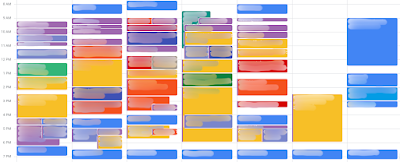
For my third post on how I use my calendar as a tool to manage my time, I thought I’d write about something more fun: color! I color-code my calendar events to help me see what events are meetings and when I’m working on which project. Yes, that’s right even though my first post focused on how calendar events are all time commitments, that doesn’t mean I threw out the ability to quickly see my meetings! [ Also posted on medium .] Since a picture can help regardless of how many words I use, here is a blurred-out version of my calendar from a few weeks ago: Meetings events are bold colors To make it easy to see which of my events are meetings, I use dark or vibrant colors. Using this color coding, I can quickly scan my calendar to know what events are meetings that cannot move unless I coordinate with someone first. Versus what events are work sessions that I could potentially move around as needed. I do all of this using Google Calendar. If you have access to the enterprise version...

Using a Calendar for Better Time Management: What I do (Part 1)

 I use Trello to keep track of everything I have to do, as seen by my multiple blog posts on it (task tracking for a big class , personally , and a conference and a whole board about podcasts I listen to ). However, I also use my calendar to help me manage my time, so I actually get most of it done. I use my calendar to plan out when I will work on certain tasks and to force myself to actually recognize what is a reasonable task list. [Also posted on medium .] Confession time: I’ve always struggled with planning more tasks than I actually have time for. This is due to many of the usual suspects: not time-boxing strongly enough, having more tasks than will fit in a 40-hour work week, and the planning fallacy of underestimating how long something will take me. Over the years, I’ve fiddled, gotten rid of, and layered different strategies for managing my time and task list such that things are much less messy and I’m overworking myself less. And since reflection is useful, I decided t...

New Resolu... Theme! And organization

As the year draws to a close, it's that time of year to start thinking about new year resolutions. So I thought I'd write a quick post on what I'm currently contemplating about what I plan to do in hopes that it'll help others by raising awareness of an example of how to think of this. [Also posted on  medium .] First, I just discovered The Theme System  through a recent CGP Grey video . He created it with Myke Hurley , and they discuss it on their podcast Cortex , which I also just started listening to. My new year resolutions have been really stagnant the past few years, where I recycle them and mostly succeed at them. And yes, I know most research says people fail at new year resolutions, but I'm on the opposite side in the sense I pick ones that I know I can achieve. However, I've been reusing them the last few years out of fear if I don't make them my resolutions, I won't do them, and I want those things in my life. The Theme System , in short, is ...

How I Track The To-do List For My 200+ Student Class

Image
This is also  posted on medium . This is post #4 of a 5 post series on how I organize the teaching staff for my 200+ student class. This post discusses how I track all the class’s tasks. I start with an overview of Trello , the tool I use to track tasks. Next is a discussion on my overall task management approach. I then move on to how I use Trello to structure the task lists, common and recurring tasks, and a task’s life cycle. Finally, I close with the advantages I see for having an externalized task list. The other posts in this series are as follows (I’ll update with links as I post): Overview Teaching staff roles How I communicate with my teaching staff How I track the to-do list (You are here) How I run the head staff meetings Terminology Rather than require you to read my teaching staff roles post , here is a quick refresher: Teaching Associate (TA+)  — A full-time department staff member (not a student) assigned to my class. She serves as my right-hand person with many and...

How I track my to-do list

This is also on medium . I use Trello  to track all the things I need to do. Trello, at its core, is just a to-do list management tool. It is versatile to many organization strategies and is great for a single person or a team to organize the tasks that need doing. However, this versatility can be very daunting as a novice because you are just starting to figure out a system to keep track of what you need to do. And a novice rarely does well in an environment where there are many ways to do the same thing, a.k.a. a versatile system. A beginner does not have enough experience to determine what technique is better than another. Moreover, a novice finds it challenging to keep track of the many ways to do the same thing. So, if you are a novice, here are my suggestions for how to use Trello to track your personal to-do list (how I use it to organize my research team(s) and teaching team(s) I'll leave for a different blog post). First, I'll go over the fundamental way I use Tre...