Posts

Showing posts with the label time management

A Framework I'm Developing to Decide When to Say Yes to Service Requests

Image
When I became an associate professor of the practice, I said yes to almost everything because I thought that was what I was supposed to do. That led to an unsustainable workload that I wrote about here . [ Also posted on Medium. ] In this post, I share a framework I’m developing to help me decide whether to say “yes” to a service request, with the goal of thinking more strategically rather than reactively. I’m writing this for anyone who feels like they are spending too much time on service or feeling overwhelmed by it all. I’m also writing it for current and future me as I navigate these requests. Understand why you have too much service Before using a strategy to better handle service requests, we must know thyself! Use the Five Whys to dig deeper In some ways, the answer to this question seems obvious, because you keep saying “yes.” But we need to dig deeper by using the Five Whys from design thinking. The Five Whys is an iterative process for exploring the causes and effects...

Impacts on my workload when I became an Associate Professor

Image
I became an Associate Professor of the Practice in January 2024. This means academic year (AY) 24–25 was the first time I had to negotiate the service requests and demands of an associate professor. Now that the academic year is over and I spent the last semester digesting the repercussions of those negotiations, I thought I’d write a blog post about it. My hope is that this blog post can serve as a case study on how workload changes when you become an associate. [ Also posted on Medium. ] First, my experience may not be yours, but I think sharing it would be useful to others. It gives you, my reader, a visceral sense of what could happen. Moreover, this blog post is a way for me to better process what happened. It also provides future me with a snapshot of what that first year was like and helps me better imagine the trade-offs and repercussions of my decisions. So this blog post is unlikely to be for everyone, dear reader. But for some of you, let me provide a bit more of a vivid vis...

Your Productivity System Needs to Evolve with You

If you follow this blog at all, you know how much I love thinking about productivity ( to-do list tracking , calendar time management , time tracking , etc.). So, hopefully, it should come as no surprise that I believe a person’s system that helps them be productive needs to evolve. As time passes, things change, and so must the productivity system! There are so many changes that could trigger a need to reflect and evolve: a change in service responsibilities, a change in a course, the arrival of a child, a change in how your kids need you, etc. [ Also posted on medium. ] So, this blog post is about how I deliberately and conscientiously evolve my productivity system. I’ll focus on what I generally do and provide some concrete case studies in hopes that they will help you think about your own situation. General Process My process has two main parts: a mindset and a monthly reflection . There are a few pieces to the mindset. First is just accepting that the productivity system has to c...

How I Track My Time

Image
A common tactic for better managing your workload is tracking how you spend your time. But what does that even mean? Most of what I’ve read explains it in a few brief sentences, which I find dissatisfying. There are so many ways to track your time, after all! [ Also posted on medium. ] So, here is how I track my time. And I’ll frame this blog post as a case study to help you think about what would work for you. I do not recommend starting by doing what I do because my process is the evolution of 10+ years of tracking. Moreover, I’m a data geek who loves to play with data. A simple piece of paper where you jot down start and end times can be good enough. This blog post is more for those who want something a bit more technical, like a spreadsheet that you can use to do some math for you and more easily analyze the results. Why do I track my time? Knowing why you are tracking your time is valuable framing to help you decide how you will do it. I track my time for three reasons: accoun...

Using My Calendar to Audit My Time (Calendar Time Management Part 4)

Image
So, first, I wrote about my general philosophy and mechanics of using my calendar for time management . Then, I introduced the idea of adding a one-hour, daily buffer event to allow some slack in my schedule . In the third post of this series, I discussed the usefulness of color to help visually see what kind of time commitments I have in a given week . For my final post of this series, I will give you my potentially oddest tactic: updating the calendar as time passes to reflect what actually happened. You can actually see it in the screenshot I shared in the last post about color . Updating my calendar as I go helps me mindfully notice where I spend my time so I can proactively alter course as needed while also serving as a quasi-log to better understand how I’m spending my time when I pause for a deeper historical reflection. [ Also posted on medium. ] To show more what I mean, here is a recent week before it actually happened. Note I have my calendars start on Mondays since the wee...

Color Coding for Clarity (Calendar Time Management, Part 3)

Image
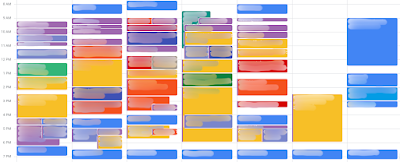
For my third post on how I use my calendar as a tool to manage my time, I thought I’d write about something more fun: color! I color-code my calendar events to help me see what events are meetings and when I’m working on which project. Yes, that’s right even though my first post focused on how calendar events are all time commitments, that doesn’t mean I threw out the ability to quickly see my meetings! [ Also posted on medium .] Since a picture can help regardless of how many words I use, here is a blurred-out version of my calendar from a few weeks ago: Meetings events are bold colors To make it easy to see which of my events are meetings, I use dark or vibrant colors. Using this color coding, I can quickly scan my calendar to know what events are meetings that cannot move unless I coordinate with someone first. Versus what events are work sessions that I could potentially move around as needed. I do all of this using Google Calendar. If you have access to the enterprise version...